Recently I’ve been running swarms of coding agents on my laptop. At some point I started to feel like my laptop is haunted, being puppeted by many beings out of my control.
For example, I’ll go to develop on jep, and run into:
% npm run dev

> dev
> react-router dev

Port 3000 is in use, trying another one...
  ➜  Local:   http://localhost:3001/
  ➜  Network: use --host to expose
  ➜  press h + enter to show help
Hey! Who is using localhost:3000 ?!
How to use whoport
whoport is my new small, sharp tool to solve this. Pass in a port and it’ll tell you what command (and therefore what path -> project + worktree) is using it:
% whoport 3000
PORT   PID      COMMAND
3000   61981    node ~/conductor/workspaces/echo/rome-v3/target/debug/api
whoport can look up multiple ports at once:
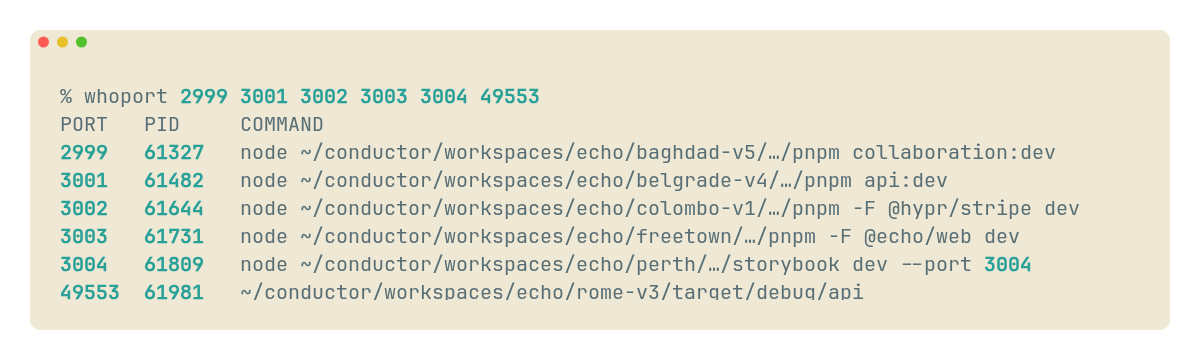
Check it out here on GitHub 🐈⬛
GitHub - cmnord/whoport: Who's using this port? Who's using this port? Contribute to cmnord/whoport development by creating an account on GitHub. https://github.com/cmnord/whoportAfter you’ve found the process using your port, you can obviously kill -9 it 🔪 or otherwise shuffle ports around.
Why? ps + grep falls apart with coding agents
My previous tool for this was good ol’ ps with some text searches.
ps (“process status”) lists information about processes running on your
computer.
The typical command is ps aux to list all running processes.
I used this in combination with a search tool like grep (or ag or, lately,
rg) like so:
 Atuin v18.19.0                                                               <esc>: exit, <tab>: edit, <enter>: run, <ctrl-o>: inspect                                                        history count: 18631
  Search │ Inspect

  3 111ms   3mo ago ps aux | rg 'expo start'
  2 101ms   3mo ago ps aux | rg 'dev:'
  1 128ms   2mo ago ps aux | rg 'expo'
  > 123ms   2mo ago ps aux | rg 'expo '
 [     GLOBAL     ] 'ps aux'
 ps aux | rg 'expo '
shoutout to atuin
ps aux | rg 'npm ' worked when I had a hunch about the name of the command
and I could search them.
But now I have like 20–50 node processes running on my computer at any time…
% ps aux | rg 'node' | wc -l
      53
% ps aux | rg 'npm ' | wc -l
      28
translation: count how many running processes begin with 'node ' or 'npm '
Moreover, the commands agents kick off are completely unreadable…
% ps aux | rg 'npm ' | head -n 2
cnord            21752   0.1  0.4 446355296 149152   ??  S     8:02PM   0:00.22 node /Users/cnord/.nvm/versions/node/v22.22.3/bin/pnpm -C packages/editor exec vitest run --environment jsdom src/note/index.test.ts src/plugins/doc-change-listener.test.ts
↳ Okay, seems like it’s running Vitest, that’s fine.
cnord 6522 0.0 0.0 435341104 5136 ?? S 7:46PM 0:00.01 /usr/bin/open -n -W -o target/debug/example-dev.stdout.log --stderr target/debug/example-dev.stderr.log --env RANDOM_CONFIG_VAR=foo --env VITE_API_URL=https://api.example.com --env YOUR_SECRET_KEY=hunter2 --env YOUR_RANDOM_OAUTH_CLIENT_ID=hunter2 --env PATH=./my/whole/hecking/path/list/.bin:/......... target/debug/Example.app
↳ What in the world is happening in this 3,000-character command which has my whole env and PATH in it???
which of you is hogging my port?
whoport under the hood
whoport glues together ~two other tools: stalwart ps, plus lsof to list open files.
The core lsof command is:
lsof -t -nP -iTCP:"$port" -sTCP:LISTEN
Brief explanation of the command:
| flag(s) | meaning |
|---|---|
-t |
terse output: PIDs only, no header |
-nP |
skip DNS resolution and service name lookups |
-iTCP:$port |
only TCP sockets using this port (local or remote) |
-sTCP:LISTEN |
only TCP sockets in listen state |
So with just this command we can get a newline-separated list of process IDs (PIDs).
whoport turns this into a comma-separated list to hand to ps.
Heroic ps returns, instead filtering by PID instead of search on the commands!
% ps -o pid=61981,command=COMMAND -p 61981
61981 COMMAND
61981 node ~/conductor/workspaces/echo/rome-v3/target/debug/api
So now I know that the rome-v3 echo worktree is using the port!
And from there I can *ahem* terminate it or move aside.
localhost:3001 isn’t so bad, anyway.
Filling out your tool belt
I keep little scripts like this in my dotfiles repo, which documents my favorite terminal commands and setup across laptops and machines. 🛠️
You should too! Some influential blogs on this topic:
- Your Dotfiles Are Meant to be Forked, Zach Holman
- Managing Your Dotfiles, Anish Athalye
Read more about tiny personal programs here:
- Some tiny personal programs I’ve written, Julia Evans
And to learn more about the command line, ps, etc., I highly recommend The Missing Semester of Your CS Education.
Happy coding :)